1. Create the return
The client needs a client group with an individual entity. If the entity is new, add it from Entities with its tax file number; the form checks the number's nine digits and checksum, and the number is stored encrypted.
Go to Returns, choose New Return, and follow the four steps: select the entity, choose the return type, choose the financial year, and confirm. Choose FY2025 for a return you intend to complete. FY2026 can be opened, but it is a preview and is not treated as ready for lodgement.
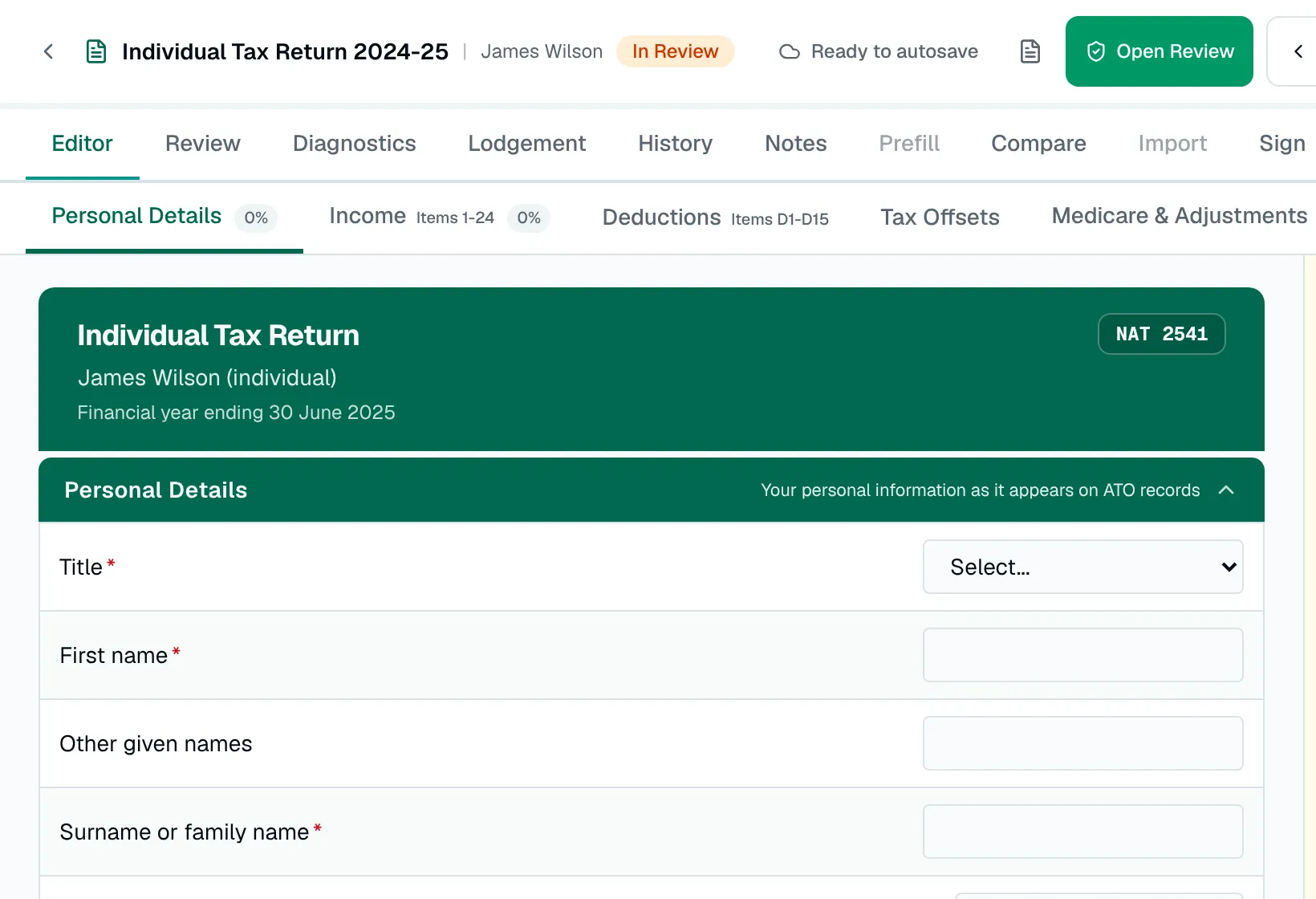
2. Find your way around the editor
The editor follows the ATO's individual return. Sections are listed down the side with a completion percentage, and the return saves as you type. Alt with the left and right arrow keys switches between parts of the return, and Alt with the up and down arrows moves between sections, so you can work through a long return without the mouse.
Start with Personal Details and the questions every return answers: whether there was a capital gains tax event in the year, an interest in a controlled foreign company, a transfer of property or services to a non-resident trust, and foreign assets worth A$50,000 or more. These are required on every individual return, so a return without them stays incomplete.
3. Enter income as rows
Most income items are repeating rows rather than single totals: one row per employer at item 1, one per account at item 10, one per distribution at item 13. The return adds the rows up for its totals, and the Income Details schedule itemises the same rows. Enter what the document in front of you says, row by row:
- Salary and wages with the payer's details and tax withheld.
- Lump sums, termination payments, government allowances and pensions, and super income streams.
- Interest and dividends, with the account holders and each holder's share for a joint account.
- Partnership and trust distributions with their credits.
- Foreign income, with the foreign tax paid that feeds the foreign income tax offset.
4. Deductions
Deductions D1 to D15 are rows as well. Each row asks for a description and, where the ATO's schedule needs it, the kind of claim: the clothing that laundry was for, or the type of an other deduction. Those details are what the Deductions schedule itemises, so complete them even when the amount is small.
5. Rental properties and capital gains
Add one row per property at item 20 with its suburb and state, the client's ownership percentage, gross rent and other rental income, interest, capital works and other rental deductions. The owner's share is applied to every amount on the row, and the Rental Property schedule shows each property's totals and the client's share of each.
Capital gains are worked out in the capital gains worksheet: asset categories, capital losses, the discount and any concessions. The worksheet carries through to item 18 and to the Capital Gains schedule. If the two disagree, the return names the amount that differs instead of lodging both.
6. Business income
Item 15 has a group of business activity rows for non-primary production and a matching group for primary production. Each activity records its income, expenses and net amount by kind of business. Payment summaries for business income, such as payments where no ABN was quoted or labour hire payments, are entered once each and must add up to the amounts the return reports; if they do not, the return says which amounts differ.
Personal services income questions are asked in the order the ATO asks them, and only the tests that apply are shown. Business loss details and deferred losses are recorded at items 15 and 16. If a group does not apply, leave it empty; an empty group does not hold the section open.
7. Understand schedule blockers
When income or deductions need a schedule, Cassandra Tax builds it from your rows and checks it against the ATO's official schema. If an amount cannot be itemised, for example a foreign pension with an undeducted purchase price, the return shows a schedule blocker that names the item. A blocker fails validation and stops lodgement, and the blocked schedule is never sent half-built.
8. Offsets, Medicare, and getting ready for review
Complete the offsets that apply, the Medicare levy and surcharge items with the private health insurance policy details, the income tests and any study loan repayment. Then open the Diagnostics tab and run diagnostics. Errors and warnings are listed with the section they belong to.
The Review tab shows an indicative tax estimate: taxable income, gross tax, the low income tax offset, Medicare levy and surcharge, study loan repayments, credits and the estimated refund or amount owing. It says which adjustments it leaves out, and the ATO's assessment is always the authority. When every section is complete and diagnostics are clear, move the return to review. The review and declaration guide takes it from there.
Use the Notes tab for anything the reviewer should know, and the History tab to see who changed what. The return's ATO reporting period is linked from the ATO's lodgement list, which needs ATO access that is not live yet; see the lodgement readiness guide.